target
Prompt-Aware Translation Modes
Genre selection routes each request into specialized translation prompts for biography, academic theology, fiction, or devotional material.
A production workflow that receives translation requests, processes them in structured stages, and delivers the final output automatically.
The fundamental features that drive our automated translation workflow, ensuring precision, context-awareness, and high efficiency.
Genre selection routes each request into specialized translation prompts for biography, academic theology, fiction, or devotional material.
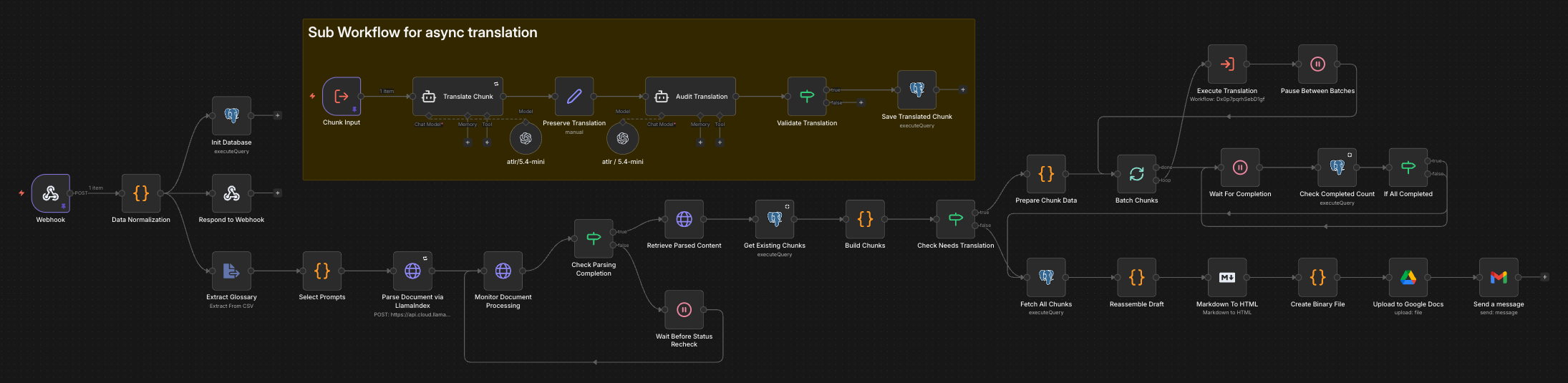
The workflow coordinates webhook intake, parsing, chunk creation, sub-workflow execution, reassembly, Drive upload, and email delivery.
Postgres-backed chunk records let the system skip already translated segments and continue work only where new processing is still required.
To ensure optimal throughput and accuracy, ensure your source files adhere to the following technical specifications.
PRIMARY SOURCE
PDF (Standard/OCR)
GLOSSARY SUPPORT
CSV, XLSX, PDF
METADATA PARAMS
JSON Webhook Body
MAX FILE SIZE
50MB per Request
Expand each stage to see what happens after the request is received by the translation pipeline.
01. Webhook + Normalization
Receives multipart data, normalizes the payload, initializes chunk storage, and returns an immediate success response with execution id.
02. Upload + Polling
Uploads the source PDF to LlamaIndex, monitors parsing status, and retrieves structured markdown output once processing completes.
03. Chunk Builder + Postgres
Builds translation-ready content chunks and compares them against existing Postgres records so completed work can be skipped safely.
04. Sub-workflow Dispatch
Prepares context-rich chunk payloads, executes the translation sub-workflow in batches, and pauses between cycles before resuming.
05. Draft + Export
Fetches translated chunks, rebuilds the draft in order, converts markdown to HTML, and generates the final binary output file.
06. Drive + Gmail
Uploads the completed file to Google Drive and sends the result link to the requester by email.